

AI avatars that present, answer and assess every learner one-to-one. Build your modules in minutes, from your existing materials.





- IÉSEG
- emlyon business school
- IMT Nord Europe
- Un Océan de Croisières
- Microsoft
-
7%
completion on non-mandatory e‑learning
When nothing requires them to finish, most learners drop out before the end.
-
50–100 h
to produce 1 hour of content
Storyline, Rise 360… Traditional authoring tools require instructional design experts and weeks of production.
-
€50,000
per hour of video content
Professional video production is extremely costly and becomes obsolete as soon as the content changes.
-
80%
of content forgotten after 7 days
Completing a module is not mastering the topic: without real-life practice, the method never gets applied on the job.
-
20%
of learners share feedback
Without real feedback, it is impossible to know what was understood or what needs to be improved.
-
25%
of adults have a learning difficulty
A one-size-fits-all, rigid format cannot adapt: some learners never make the method their own.
The best learning experience? A one-to-one video session with an expert who adapts and answers your questions.
 Complement recreates it with AI.
Training that adapts, not static content
- Video / SCORMStatic
- Simple chatbotPartial
- ComplementAdaptive
Complement recreates the best learning experience: a one-to-one expert who delivers the course, answers questions and checks that everyone understood.
-
Everyone picks their trainer
Four trainers, three outfits, voice speed and tone: each learner sets up their avatar.
-
Answers limited to your content
Learners ask questions by voice or in writing. The avatar answers from the resources you provided, and cites its source.
A completed module should have taught a method that the learner can then apply. In Complement, learners explain in their own words, practise on real cases and are assessed orally: you see what they can do, not just that they finished.
Oral assessment
Learners answer in their own words; the avatar assesses and corrects their answer.
Real-life cases
Concrete cases to apply the method, not just recognise it in a multiple-choice quiz.
Points, badges and leaderboard
What makes people finish: every concept mastered earns points.
Your trainers already have their PowerPoints. Complement turns them into interactive courses led by an AI avatar, no technical skills required.
-
01
Describe your course, add your materials
Topic, audience, tone, plus your PowerPoints, PDFs, Word files or legacy SCORM packages: AI uses them as raw material.
-
02
AI generates the module
Chapters, slides, avatar scripts, quizzes and interactions: a complete first draft in minutes.
-
03
You review and publish
Rephrase a script, turn a slide into a quiz, test it, then publish, standalone or in your LMS.
One hour of training in 90 minutes
Import, text, interactions and quizzes: all in one place.
Deploy in a few clicks
Direct publishing, link sharing or LMS integration.
Empower your trainers
Easy to pick up, no instructional designer needed.
The first continuous improvement system for e‑learning: through transcribed oral exchanges, the questions learners ask and built-in surveys, you collect data continuously. Analyse it, then complete and improve your modules in a few clicks.
- 27/09 10:42Is legitimate interest enough for a newsletter?
- 27/09 10:17What is the difference between consent and contract?
- 26/09 17:55How long do we have to answer an access request?
- 26/09 16:08What exactly counts as a data breach?
- 26/09 11:31How do you prove consent?
- 25/09 18:02Can a processor keep the data?
Real-time dashboard
Progress, time spent and quiz results, by course, by class and by learner.
Questions asked to the avatar
Chapter by chapter: what intrigues your learners and what trips them up.
First-try quiz success
A question everyone misses? The in-depth analysis finds the cause and suggests the fix.
Smart analysis
AI sums up your learners' answers and highlights what to improve.
Deliver your modules from Complement or inside your LMS with the LTI 1.3 standard. Learners sign in with their Microsoft or Google account and see your logo.
Standard LTI
Moodle, Blackboard, Canvas, iSpring Learn and every LMS that supports LTI 1.3. Integration in 2 hours.
Seamless SSO
Your learners sign in once with Microsoft or Google.
Synced data
Progress, scores and completions flow back to your LMS automatically.
Your branding
Your logo on the learning space and in your modules.
360Learning, Moodle, Blackboard, Brightspace, Docebo, LearnWorlds, Canvas, Apolearn
LTI 1.3 compatible · HTTPS · SSL encryption
Company, school, training centre or public body: the same product, tuned to your constraints.
-
Enterprises & mid-market
Ultra-fast operational training
Compliance, onboarding, upskilling: train your teams anywhere, without expensive agencies.
- Empower your in-house trainers
- 2 FTEs saved per year on content creation
- SSO integration with Microsoft / Google
-
Higher educationPopular
An AI virtual tutor behind every student
Business schools and universities: give your students an immersive, personalised learning experience at scale.
- LTI integration with your existing LMS
- Annual and multi-year licences
- Instructional design support included
-
Training organisations
Scale your training catalogue
Training centres, CPD providers, apprenticeship centres: expand your catalogue without exploding production costs.
- Pay-per-use pricing
- No commitment, try risk-free
- Dedicated support and guidance
-
Public sector
Train every public servant, at scale
Local authorities, ministries, agencies: one module for every site, without mobilising all your trainers.
- Data hosted in France, processed in the EU
- Answers limited to your sources
- Annual licence on quote
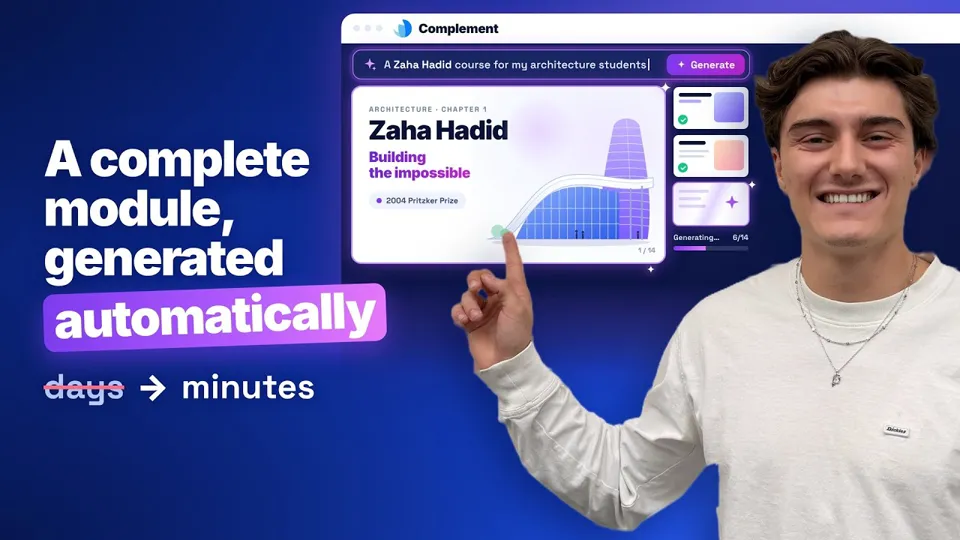
Describe your course and watch the AI generate a complete module, in about three minutes.
Everything you want to know before getting started.
What is Complement?
A next-generation e‑learning platform that trains learners with a conversational AI avatar: a virtual trainer that delivers a structured course, answers every question in real time and assesses learners orally, like a one-to-one expert, at scale. Modules are built with an AI-assisted authoring tool (PowerPoint, PDF and Word import) and keep improving through analytics.
How is it different from other AI solutions?
A chatbot answers questions passively. Complement trains actively: the avatar follows a structured learning path (chapters and slides), questions the learner orally, assesses their knowledge and checks they understood, exactly like a trainer in a one-to-one session.
Does Complement work with Microsoft 365?
Complement does not integrate with the Microsoft 365 suite, but it supports Microsoft SSO (Azure AD): your users sign in with their existing Microsoft credentials. Google sign-in is also available for Google Workspace.
Is it suitable for smaller organisations?
Yes. The designer licence starts at $49/month, and your learners' usage is billed by the hour ($6) or per learner ($7/month), with no commitment. The 7-day free trial lets you create and test a complete module, no credit card required.
How long does it take to create a first module?
AI produces a first draft in minutes. A one-hour module, reviewed and enriched, takes about 90 minutes on average, versus 50 to 100 hours with a traditional authoring tool.
Is data secure and GDPR compliant?
Compleducation is a French company. Data is hosted in France, processed in the EU and encrypted in transit and at rest. Exchanges between learners and avatars are confidential and belong to your organisation.
Stay ahead in AI e‑learning
Our articles, case studies and webinar invitations. Joined by 2,000+ L&D professionals.