

Every employee answers out loud, puts things in their own words and practises on real cases, with an AI trainer that answers and corrects them. You see, department by department, what is understood and what is not.





- IÉSEG
- emlyon business school
- IMT Nord Europe
- Un Océan de Croisières
- Microsoft
-
80%
of content not retained after 7 days
A video watched with half an eye protects neither the employee nor the company: without real-life practice, the rule stays theoretical and never gets applied.
-
0
proof of understanding
A module clicked through to the end does not show what was understood. Neither does a passed multiple-choice quiz: recognising the right answer is not knowing how to apply the rule.
-
20%
of employees share feedback, no more
With no feedback during training, the L&D team is flying blind and cannot prove effectiveness to the executive committee.
-
25%
of employees have a learning difficulty
The same module for every role and every level: part of the workforce never makes the method its own.
-
€50,000
per hour of video content
Outsourced production is expensive, takes months and becomes obsolete with the first update to the internal policy.
-
50–100 h
to produce 1 hour of content
Your subject-matter experts have the knowledge, not the time to build it in Storyline. The topic waits for the next training budget.
The best training? A one-to-one video call with an expert who adapts and answers your questions.
Complement recreates it with AI, for every employee.
Traditional e‑learning
- Slides and videos to click through
- No way to ask a question
- No proof of understanding
The same content in Complement
- An expert who explains and rephrases
- Answers to every question, limited to your sources
- Oral assessment and feedback from every employee
One platform, three building blocks: an AI trainer for your employees, an authoring tool for your experts, analytics for the L&D team.
-
01
Conversational AI trainer
A virtual trainer that presents your content, listens to each employee, answers their questions in real time and corrects their spoken answers: a conversation, not a video.
- A structured path, not a chatbot
- Answers every question
- Tracked oral assessment
-
02
Your experts remain the authors
Start from the existing PowerPoint, PDF or SCORM: the AI drafts the module, the expert reviews, adjusts and publishes. A policy changes? Edit one slide, and the module is up to date.
- PowerPoint, PDF, Word and SCORM import
- Generated real-life scenarios
- Updated in minutes
-
03
What is understood, and what is not
Feedback from every employee, gathered through spoken exchanges and the surveys built into the modules. Spot the rules that are misunderstood, department by department, and fix the module in minutes.
- Dashboard by department and by site
- Surveys built into the modules
- Smart analysis of answers
-
Onboarding
From first login to the first month
The onboarding path starts on its own at first login. New joiners work through it chapter by chapter and ask the trainer their questions instead of waiting for their manager.
- Starts automatically at first login
- Chapters in order, deadlines and reminders
- Microsoft / Google SSO sign-in
-
Compliance
Anti-bribery, GDPR, security: understood, not just clicked through
Every employee is put in a real situation and answers out loud. You know who took the module, and who actually understood the rule.
- Oral assessment in every chapter
- Tracking by department and by site
- Module updated in minutes
-
Customer service and sales
Roles where the skill is the conversation
Advisers, sales reps, support teams: they practise out loud on customer situations, and the trainer assesses every answer. What you say to a customer is learned by speaking, not by ticking boxes.
- Spoken role-plays at the end of each chapter
- Answers assessed and corrected on the spot
- Team questions flow back to the L&D team
Active recall
Remembering rather than rereading: during and at the end of each chapter, the employee answers questions out loud, in their own words. The effort of recall is what makes the idea stick.
Practice
Everyday cases: ‘A supplier invites you to a football match. What do you do?’ The employee applies the rule to a situation, instead of recognising it in a multiple-choice quiz.
Immediate feedback
Every answer is assessed on the spot: what is right, what is missing, and why. Mistakes are corrected while they are still fresh.
The question, the moment it comes up
The employee interrupts the trainer when a point is unclear. The trainer answers, rephrases it another way, then picks up again. No misunderstanding waits until the end of the module.
Training that adapts, not static content
- Video / SCORMStatic
- Simple chatbotPartial
- ComplementAdaptive
Every question asked, every spoken answer and every transcribed survey answer feeds into a dashboard. Surveys slot in between two slides: the AI trainer asks them mid-session, and every employee answers to carry on. One chapter draws far more questions than the others, or people keep getting a scenario wrong? Analyse the data and complete your module in minutes.
- 27/09 10:42A supplier has invited me to a match. Do I need to declare it?
- 27/09 10:17What is the limit for accepting a gift?
- 26/09 17:55My brother-in-law works for a supplier. Is that a conflict of interest?
- 26/09 16:08Does a business lunch count as hospitality?
- 26/09 11:31How do I raise a concern anonymously?
- 25/09 18:02Who approves an exception to the gifts policy?
Your experts already have their PowerPoints. The AI turns them into an interactive course with a virtual trainer, which the expert reviews and adjusts: no agency, no technical skills.
-
01
Describe your course
Topic, audience, tone: a few words are enough. You can also start straight from your materials.
-
02
Add your materials
PowerPoint, PDF, Word, Excel or legacy SCORM packages: AI uses them as raw material.
-
03
AI builds the module
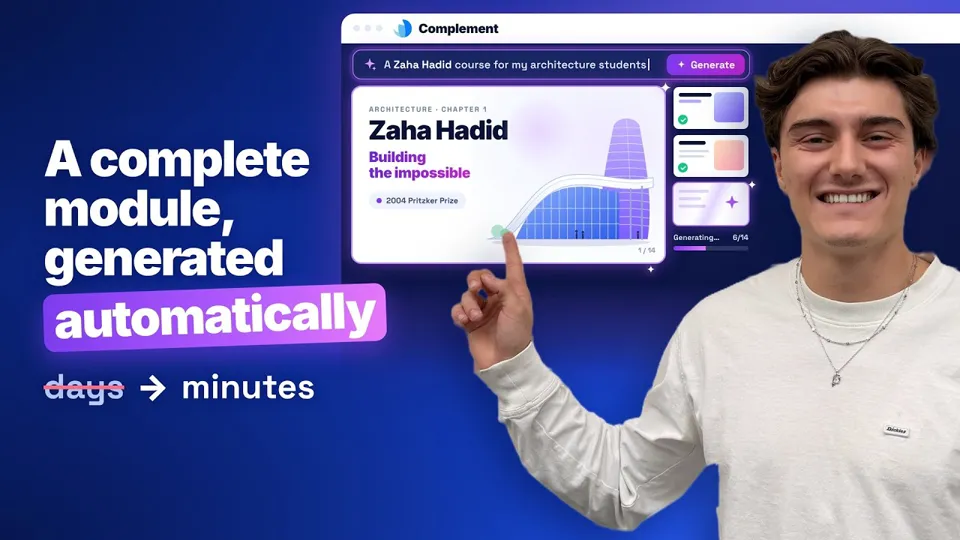
Chapters, slides, the avatar's scripts, quizzes and interactions: a complete first draft in minutes.
-
04
You review and publish
Rephrase a script, move a slide, add a question. Then publish, standalone or in your LMS.
Start from what you have
PowerPoint, PDF, Word or SCORM: the AI draws chapters, slides and real-life scenarios from them; review takes less than an hour.
A policy changes? Edit one slide
Make the fix and republish: employees see the new version, with no reshoot and no agency.
Your experts remain the authors
They review, adjust and approve every module. No instructional designer needed.
Creation, delivery, practice and measurement in one place. Keep your LMS if you have one; if not, Complement is all you need.
| Today | With Complement |
|---|---|
| An authoring tool (Storyline, Rise) and an agency | Your experts start from their existing PowerPoint, PDF or SCORM files |
| Avatar videos (Synthesia, HeyGen) | A trainer that presents, but also answers and assesses |
| An end-of-course questionnaire | Surveys built into the modules: an answer from every employee |
| Delivery and reminders in an LMS | Accounts, teams, deadlines and reminders in Complement, or LTI 1.3 integration with your LMS |
Your existing catalogue is not lost: your SCORM packages can be imported, and the AI reuses their text and images to build the conversational version.
Your employees open the modules from their usual platform, without signing in again.
LTI 1.3 standard
Integration in 2 hours with your IT team.
Microsoft / Google SSO
Sign-in with their Azure AD or Google Workspace account.
Synced data
Progress and scores flow back to your LMS.
360Learning, Moodle, Blackboard, Brightspace, Docebo, LearnWorlds, Canvas, Apolearn
LTI 1.3 compatible · HTTPS · SSL encryption
Automatic generation in three minutes, from a simple description to a complete module.
What L&D managers and IT teams ask us first.
How do you know whether an employee can apply the rule, and not just pass a quiz?
They answer out loud, in their own words, and apply the rule to concrete cases. Their quiz answers are assessed and commented on, and their questions feed into the dashboard. Complement does not replace on-the-job observation, but it tells you who can explain the rule and apply it to a concrete case, which a multiple-choice score does not.
Why an avatar?
Because a spoken conversation is more engaging than text to read. It is not a 20-minute avatar video: the trainer presents the content slide by slide, the employee interrupts whenever they like, and answers questions and real-life scenarios out loud. Everyone chooses their trainer, its voice speed and its level of vocabulary.
Can your employees sign in with their Microsoft or Google account (SSO)?
Yes. Complement supports SSO through Microsoft Azure AD and Google: your employees sign in with their work account, with no extra password. Accounts are not synced with your directory: you create them in Complement (one by one or by CSV / Excel import) with the same email address, and you remove those of people who leave. Complement does not integrate with the Microsoft 365 suite itself (Teams, SharePoint): it runs in the browser or from your LMS.
Is it compatible with our LMS? What about SCORM?
Complement integrates with your LMS through the LTI 1.3 standard (360Learning, Docebo, Moodle and most recent LMSs). We do not produce SCORM packages: the format does not let the AI trainer keep track of the conversation from one slide to the next. Your existing SCORM packages can, however, be imported: the AI reuses their text and images to build the conversational version. Without an LMS, you create your employees' accounts in Complement, or they sign in with SSO.
Where is data hosted, and who processes the exchanges with the AI?
Compleducation SAS is a French company. Data is hosted in Europe (GCP) and the AI models run on Azure servers in Europe: no transfer outside the European Union. Exchanges between employees and the AI trainer belong to your company and are never used to train a model. DPA and list of sub-processors on request. Hosting, encryption, DPA and retention periods (in French).
What happens when our internal policy changes?
You edit the relevant slide in the authoring tool and republish: the module is up to date in minutes, with no reshoot and no agency. Employees who come back to the module see the new version.
How is a licence sized for a company?
Two models: pay-as-you-go, $6 per hour of training taken (minimum purchase $60, with volume discounts), or a licence per employee at $7 per month, with no commitment. Authoring tool, AI trainer and analytics are included in both cases; designer access for your experts is $49 per month. For a group-wide rollout, we build a quote based on the number of employees and modules.
Can the AI trainer give answers outside our content?
No: the AI trainer's answers are limited to the sources your expert provided (PowerPoint, texts, attached documents). If a question falls outside that scope, it says so and brings the employee back to the content. Your expert remains the author of the module; the AI does not make up rules.

Try it free with one of your existing materials, or show us your context in a 30-minute demo.
Stay ahead in AI e‑learning
Our articles, case studies and webinar invitations. Joined by 2,000+ L&D professionals.