


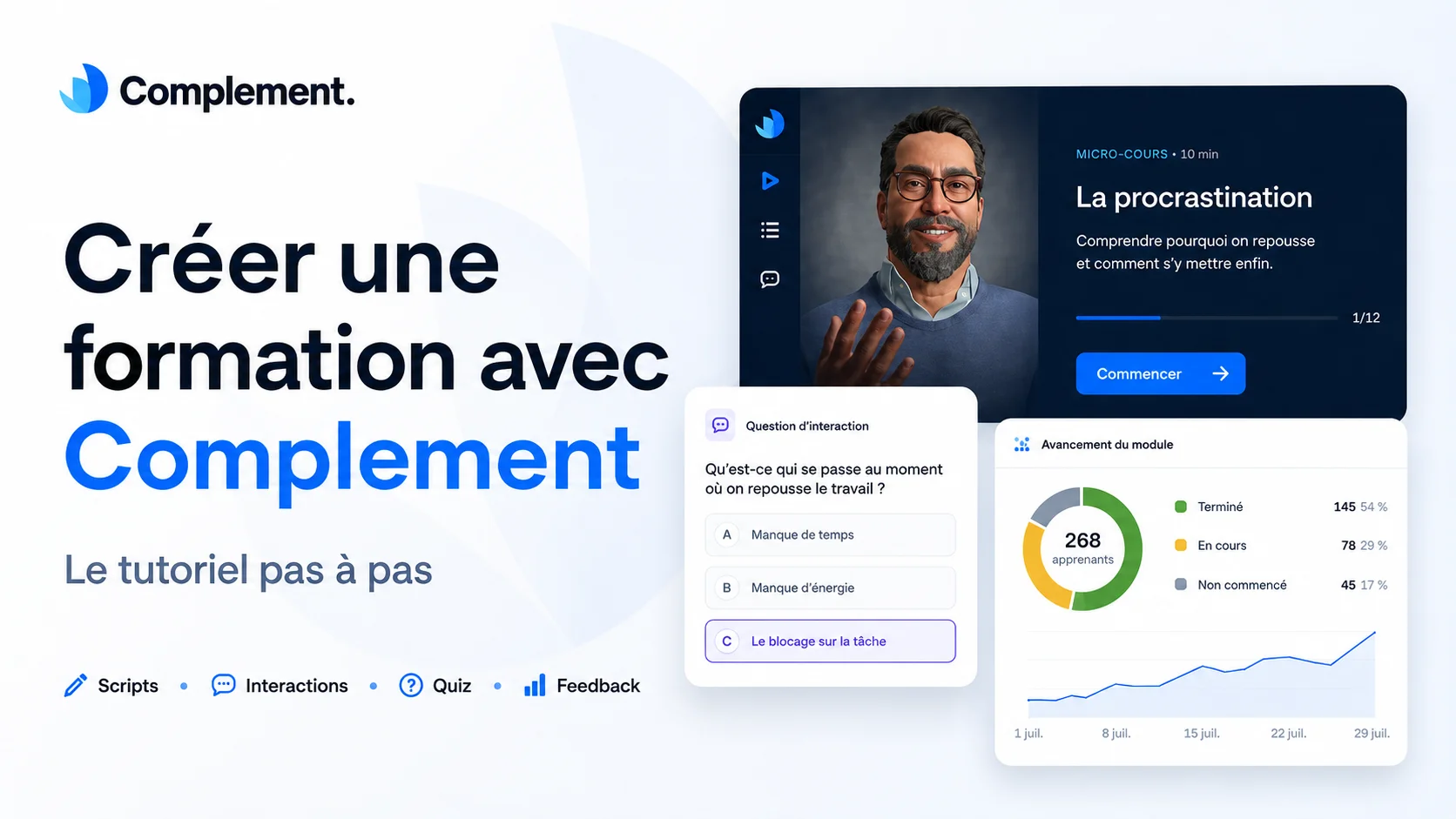
Do you already have a PowerPoint, a PDF, or materials used for in-person training? With Complement, you can use this content to create a training course led by a conversational AI avatar.
The goal isn't just to have your slides read by a synthesized voice. The avatar presents the course, answers the learner's questions, and can evaluate them orally. Meanwhile, the instructional designer can analyze these exchanges to identify misunderstood concepts and progressively improve the content.
If you usually start from existing material in a tool like Rise 360, the design logic changes here: you are no longer laying out slides, you are preparing what the avatar will explain, ask and check.
In this tutorial, we will follow the main steps for creating a training course with Complement.
To make the explanation more concrete, we will use the example of a module that explains how to overcome procrastination!
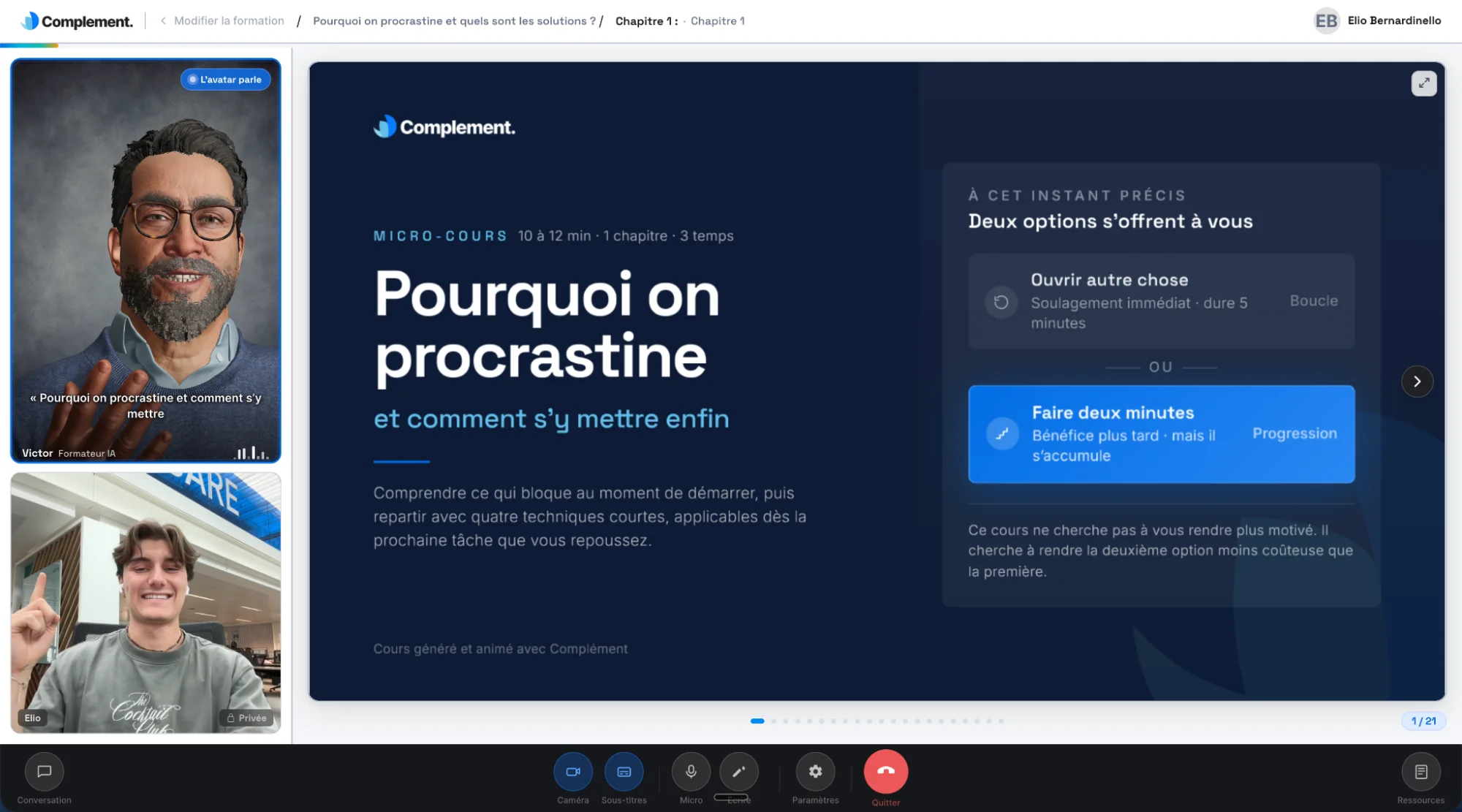
Before you start: four simple principles
Getting started with the tool is quick. However, the quality of the result depends on a few important choices.
Before creating your training course:
- Dedicate each slide to a single main idea;
- Tell the avatar what it needs to convey, rather than providing a script to recite;
- Add an interaction when the learner needs to reflect, decide, or apply a concept;
- Define precisely what the avatar should look for in the responses.
These four principles help avoid a overly simplistic module where the avatar would speak for several minutes without giving the learner a chance to participate.
The keyword for promoting active memorization is interaction!
1. Preparing the training material
Complement allows you to start from a PowerPoint, Keynote, or Google Slides document. You must export it as a PDF before importing it into the platform. Each page is then transformed into a slide within the module.
Therefore, you don't need to rebuild the entire training course in a new tool.
Before importing, it is still important to review your presentation. Material designed to be commented on live by an instructor sometimes contains:
- too much text;
- multiple ideas on the same page;
- unclear titles;
- Elements that are impossible to understand without verbal explanation.
Simply simplify the slides that need it. The visual support should help the learner follow along, while the virtual instructor (the avatar) provides explanations, examples, and transitions.
For our training on procrastination, the material could follow a simple structure:
- understanding what procrastination is;
- identifying the situations in which it appears;
- spotting one's own triggers;
- choosing a first action;
- building a method to move forward.
This structure will then serve as the guide for the avatar.
2. Creating the training card
From your "training courses" space, click on create a training course and then fill in the main information:
- the name of the training;
- the author's name;
- a short description;
The description should allow the learner to immediately understand what they will learn.
For our example:
Title: Understanding and overcoming procrastination
Description: A short training course to identify situations where we procrastinate and choose simple actions to get moving again.
It is best to avoid descriptions that are too long or too theoretical. Two or three sentences are enough to present the goal of the course.
3. Importing and organizing slides
Next, import your material into Complement.
Each page becomes a slide. You can select only the useful pages, add complementary images/videos/PDF documents, and organize your content into several chapters.
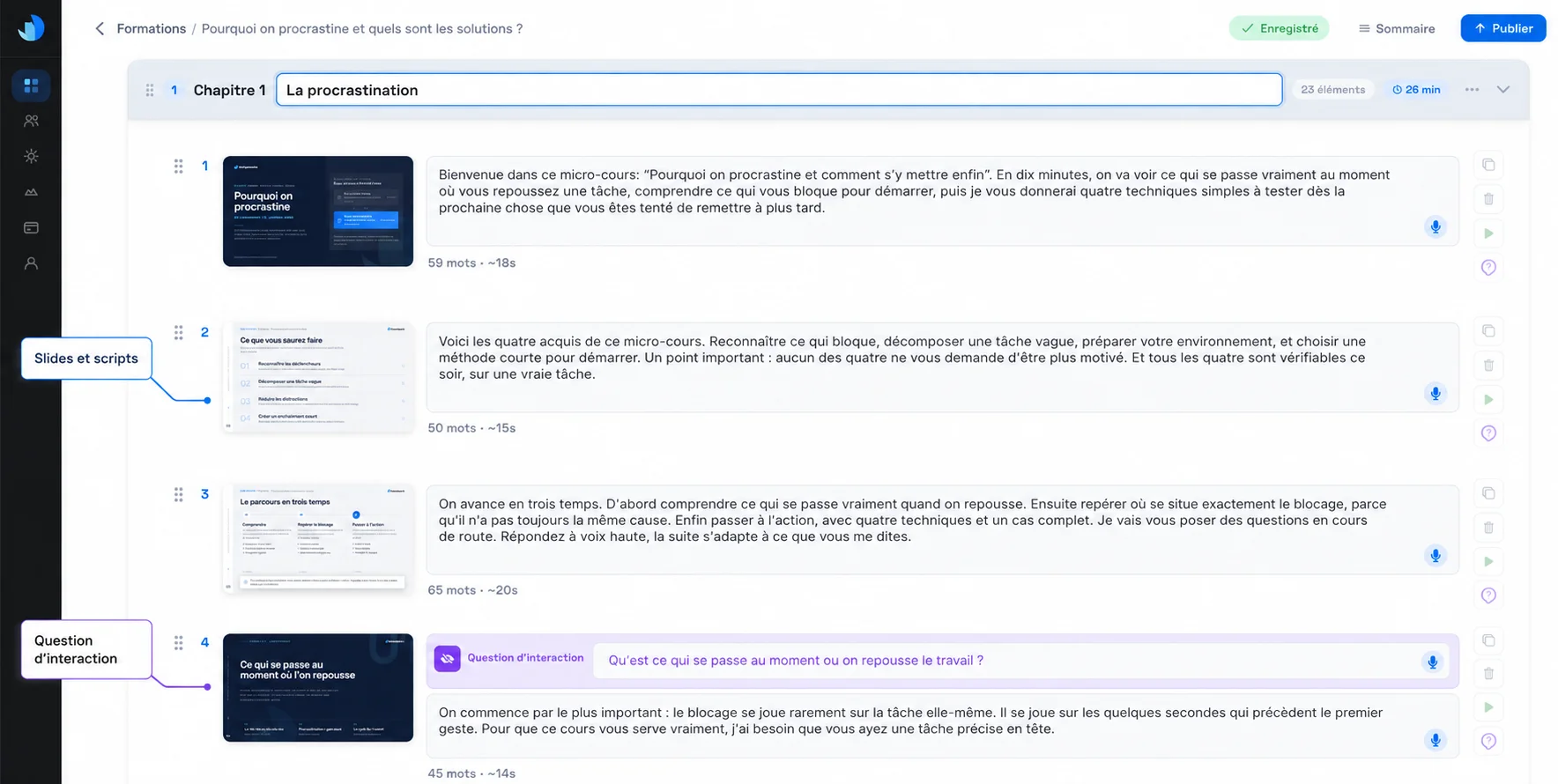
At this stage, check:
- the order of the slides;
- the logic of the chapters;
- the readability of the text;
- the approximate duration of each part;
- the possible presence of repetitions.
Ideally, a chapter should answer a specific question.
For example:
Chapter 1: Why do we procrastinate?
Chapter 2: How to identify what blocks us?
Chapter 3: How to take action?
This organization helps the learner understand where they are and allows you to add an assessment at the end of each major part to test their understanding and encourage them to participate more actively in the training!
4. Writing the script spoken by the avatar
For each slide, you can write or dictate the script that the avatar will present to the learner.
It is as if you were writing the explanations an instructor would give in front of their group. The avatar will follow this script and adapt it according to the context!
Imagine a slide titled:
Why do we put off certain tasks?
The script could be written like this:
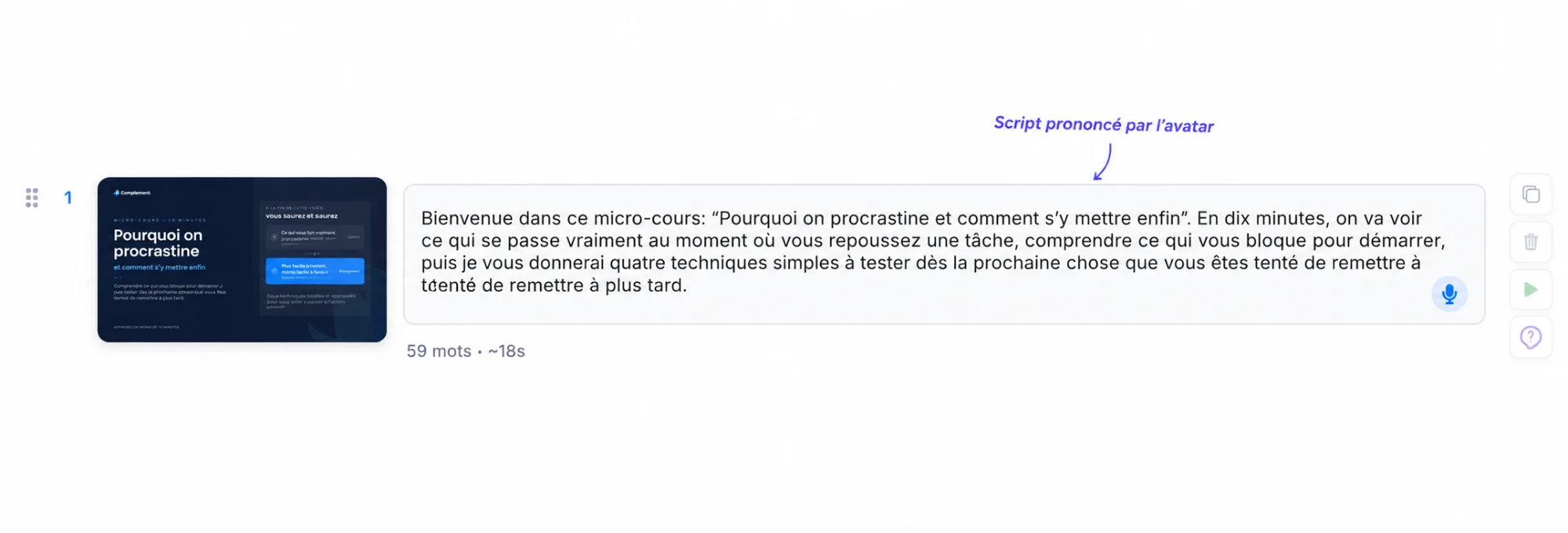
We sometimes tend to think that procrastination comes simply from a lack of motivation. In reality, we can also put off a task because it seems too long, too vague, too difficult, or uncomfortable to us. Let's take an example: you have to prepare an important presentation, but you don't know where to start. The more imposing the task seems, the more tempting it becomes to put it off until later.
IMPORTANT: The avatar will pronounce this explanation directly during the training. The script must therefore be sufficiently precise, complete, and natural to be heard as is.
Write as an instructor would speak orally
Text that is pleasant to read is not always pleasant to listen to. To make the presentation more fluid:
- Use relatively short sentences;
- Present one main idea at a time;
- Address the learner directly;
- Avoid overly administrative phrasing;
- Add concrete examples;
- Provide a transition to the next slide or to an interaction.
The simplest way is to read your script out loud before validating it. You will easily spot sentences that are too long, repetitions, or passages that lack natural flow.
The learner can interrupt the avatar to ask a question
Even if the avatar follows the prepared script, the presentation is absolutely not rigid. The learner can interrupt it during its explanation to ask a question about the displayed slide or about a point just covered.
The avatar then answers the request, provides clarification, or rephrases the explanation, then naturally resumes its course. This allows the student not to get stuck on a concept they haven't understood, unlike a classic video that they can only stop or restart.
5. Adding an interaction to make the learner reflect
As we have seen, the benefit of Complement fully appears when the learner does more than just listen.
You can therefore add an interaction question before the presentation of a slide. The avatar first asks the question, lets the learner respond, and then gives them feedback. It then resumes the flow of the training!
The goal is not to grade the learner. This interaction serves above all to make them reflect, to mobilize their knowledge, or to formulate an initial answer before discovering the explanation.
For example, before a slide dedicated to ways to fight procrastination, the avatar could ask:
In your opinion, what are the four ways that can help avoid procrastination?
The learner responds with the elements that come to mind. The avatar can then react to their answer:
You have already identified two important levers: breaking down the task and defining a simple first action. Let's now look at the four methods presented in this training.
Display or hide the slide during the interaction
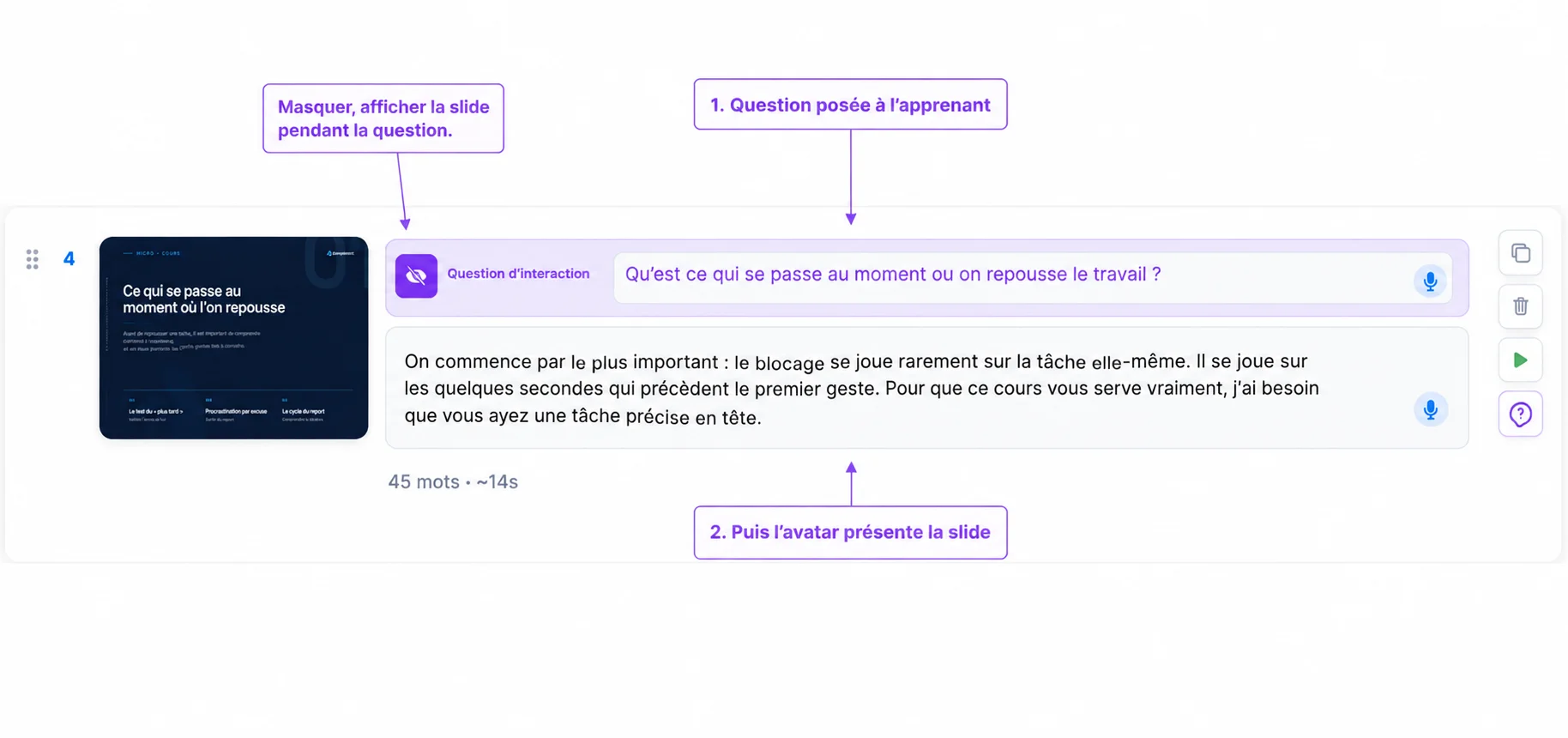
When configuring the question, you can choose to hide the slide or leave it visible during the exchange.
Hiding the slide allows the learner to answer without having the information in front of their eyes. This option is particularly useful when you want to get them to mobilize their knowledge or formulate their own ideas.
Leaving the slide displayed can be relevant when it provides visual context, presents a situation to analyze, or contains an illustration necessary to understand the question.
In practice, how does the interaction work?
The sequence is simple:
- the avatar asks a question before presenting the slide;
- the learner freely formulates their answer, without receiving a grade;
- the avatar gives them immediate feedback;
- it then presents the slide and resumes the planned script.
The interaction therefore does not replace the course. It prepares the learner to listen more actively by prompting them to reflect before discovering the explanation.
6. Creating quizzes and assessing knowledge
At the end of each chapter, Complement allows you to add a quiz to verify that the important concepts have been well understood.
These quizzes can combine two types of questions: open-ended questions and MCQs. In both cases, the interest is not limited to knowing if the answer is right or wrong: the avatar provides feedback to the learner.
Open-ended questions
For an open-ended question, you write the question and then indicate to the avatar the expected answer, i.e., the elements that the learner must have understood.
For example:
You have been putting off preparing an important presentation for several days. What action could you take today to start?
The expected answer could be:
The learner must propose a specific, realistic action that is short enough to be started quickly and directly related to the preparation of the presentation.
The learner does not need to recite an answer word for word. The avatar analyzes what they answer and determines if they have provided enough relevant elements to validate the question.
Thus, answers like "open the presentation and prepare the outline" or "book twenty minutes to start the first slide" can both be considered correct if they meet the defined criteria.
If the answer is incomplete or incorrect, the avatar explains it and provides feedback to help the learner understand what they are missing.
Single or multiple-choice MCQs
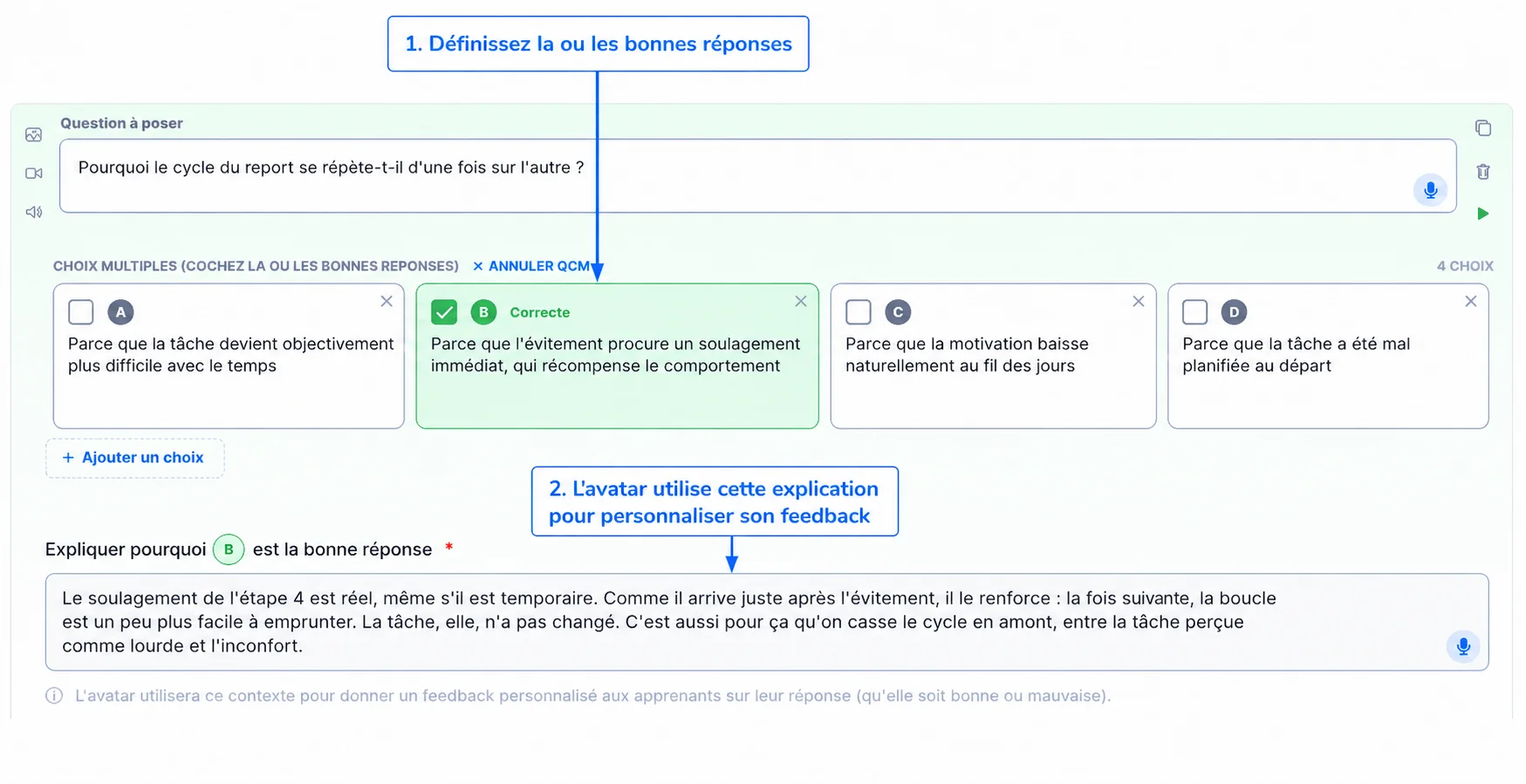
You can also create MCQs with up to six proposed answers. Depending on the question, one or more answers can be correct.
Here again, Complement goes further than a classic MCQ.
If the learner makes a mistake, the avatar does not just display "Wrong answer". It explains why their choice is not correct, indicates the right answer, and specifies why it is the most relevant.
Even when the learner answers correctly, the feedback serves as a reminder of the reasoning or the concept to retain.
Evaluation thus becomes a learning moment in its own right, and not just a means to assign a score.
Overall feedback at the end of the quiz
Once all the questions are finished, Complement also analyzes the result as a whole.
If the quiz is not validated, the avatar can indicate to the learner:
- the concepts they already master;
- those that still seem fragile;
- points they should review before continuing.
The learner gets overall feedback on their knowledge and understands more precisely what they need to work on.
This is one of the important differences from many classic digital learning modules: assessment is not just used to measure knowledge, it also becomes an opportunity to explain errors and help the learner progress.
7. Adding resources and framing the avatar's responses
You can enrich the AI avatar with PDF documents or specific web pages.
These resources can be consulted by the learner. They also serve as sources for the avatar when it answers a question.
For our module on procrastination, you could add:
- a sheet for breaking down a task;
- a prioritization method;
- an exercise to carry out after the training;
- a summary of the techniques presented.
For regulatory, technical, or internal training, you can activate RAG mode. The avatar is then constrained to construct its responses only from the selected documents and web pages, which allows for better control over its scope of response.
This feature is particularly useful when the avatar must respect a company procedure, a precise reference framework, or regularly updated documentation.
It is obviously possible to share documents with the AI only so that employees do not have direct access to them.
Before publishing: the final points to check
Before making the training accessible to learners, carry out one final complete preview of the course.
Take this opportunity to check that:
- each script is natural orally;
- the interactions work with different types of answers;
- the quizzes give relevant feedback, both in case of a right and a wrong answer;
- the expected answers for open-ended questions are sufficiently precise;
- the resources are accessible and up to date;
- each chapter follows a logical progression.
Don't hesitate to voluntarily answer incompletely or incorrectly to the various questions. It is often the best way to verify the quality of the feedback and to spot an instruction that deserves to be clarified.
A few tests are generally enough to identify a script that is too long, an ambiguous question, or an expected answer that needs to be adjusted before publication.
To go further
Interactions, open-ended questions, and personalized feedback significantly change the experience compared to a traditional e-learning module.
If you want to delve deeper into this subject, find our article dedicated to AI Avatar vs classic e-learning video
9. Publishing and tracking results
When the module is ready, you can publish it, manage access, and invite your learners.
Complement allows you to distribute the training via a direct link or integrate it into an LMS compatible with the LTI standard (Moodle, etc.). Progress data, scores, and validations can then be reported back to the training environment.
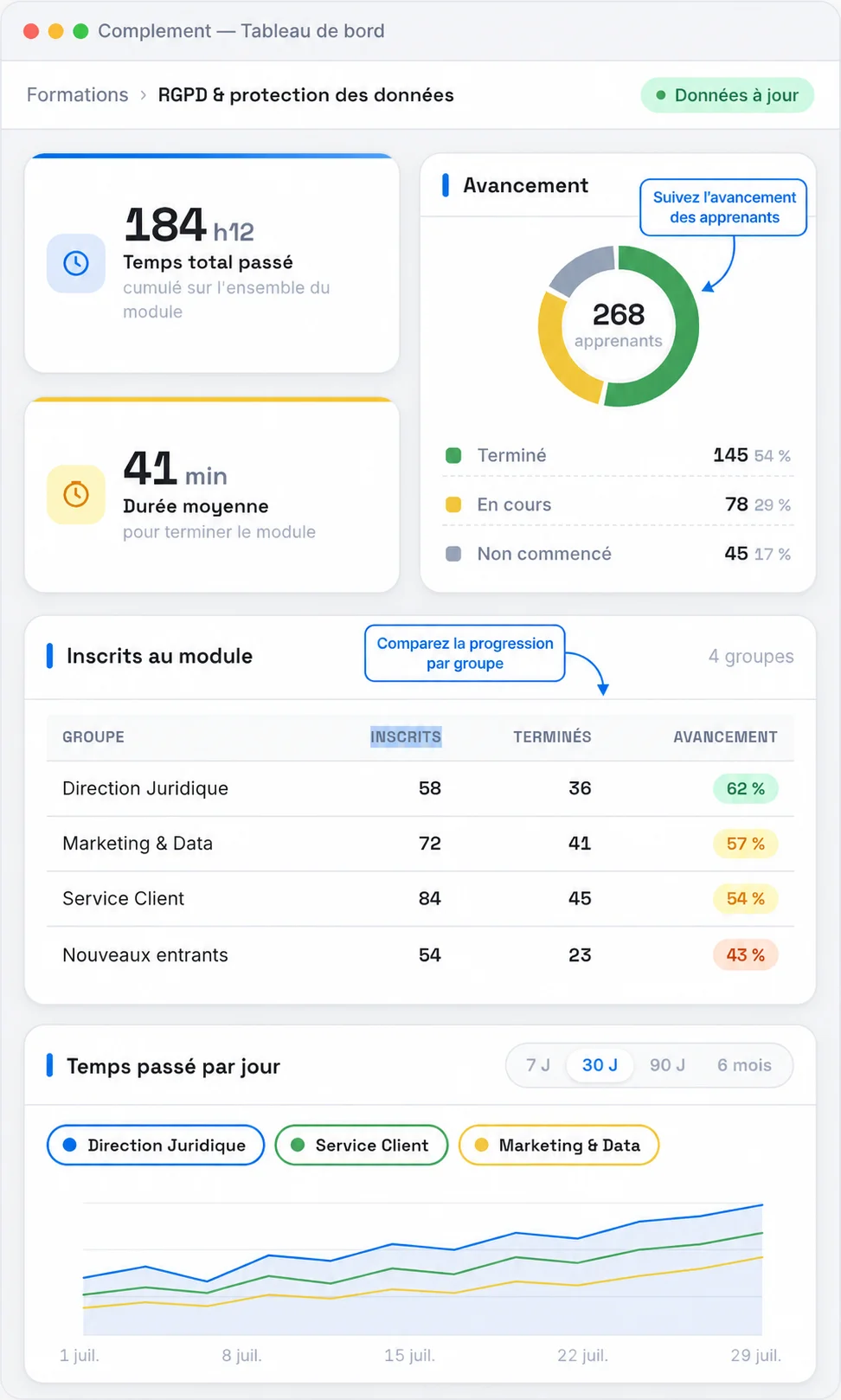
The dashboard then allows you to track:
- learner progress;
- time spent in the training;
- results on assessments;
- most frequent questions;
- notions that seem misunderstood;
- answers given during exchanges.
This is one of the important differences from a classic module.
A score indicates that a learner has passed or failed a question. A conversation allows for a better understanding of why they are hesitating, what they misinterpreted, and the information they need.
Complement allows you to use these exchanges to correct or enrich the relevant passages directly. The training can thus be improved as sessions progress.
What Complement changes compared to classic digital learning
Complement does not replace the usual principles of good training. You must still structure the content, define objectives, and prepare consistent assessments.
The difference lies mainly in the experience offered to the learner.
The learner can interrupt the content
Faced with a video or a linear module, a question often remains unanswered. With a conversational avatar, the learner can ask for an explanation or a rephrasing during their journey.
Feedback can adapt to the response
The feedback no longer depends solely on the option selected in an MCQ. The avatar can comment on an open-ended response, recognize a correct part, and ask to clarify what is missing.
Assessment can focus on reasoning
Some skills are difficult to verify with a list of predefined answers. An oral question or a role-play allows you to observe the way the learner analyzes the problem.
The designer better understands the difficulties
The exchanges reveal recurring questions, misunderstandings, and sticking points. This information allows you to improve the content more specifically than just a completion rate.
Conclusion
Creating a training course with Complement allows you to start from existing material while adding a conversational dimension.
The method can be summarized in a few steps:
- prepare and import your material;
- organize the content into chapters;
- write the script that the avatar will present;
- add interactions to make the learner reflect;
- create quizzes and define expected answers;
- add useful resources;
- test the entire course;
- publish the training and then analyze the results.
For a first module, no need to try to multiply the features. A few well-placed interactions, clear scripts, and properly configured quizzes are enough to create a much more engaging experience.
The key is to maintain a simple path to follow, in which the learner can listen, reflect, respond, and get feedback when they need it.
Do you want to test Complement for yourself? Try it for free to discover the platform and start building your first training course.
Do you prefer to be accompanied? Book an appointment (demo) to see more in detail how Complement works and discover the possibilities adapted to your needs.