

White-label your platform
Dedicated address, brand logos, a sign-in page in your name and emails sent in the brand's name: what white label changes.
In Administer your platform
- Customise your organisation
- Manage the teaching team
- Track usage
- Activate your platform
- Manage your subscription
- View your enterprise contract
- Why is your platform read-only?
- Understand your administrator alerts and emails
- Enable SSO sign-in with Google or Microsoft
- White-label your platform
- Which options should you ask your Complement account manager for?
- Connect your LMS with LTI 1.3
- LMS: add courses, manage groups and grades
- Data security and privacy
With white label, your platform presents itself under a brand other than Complement. It has its own address, the brand's logos and a sign-in page in your name, and its emails are sent in the brand's name.
Before you start#
- White label is set up by Complement. There is no settings screen in the app: ask your Complement account manager for it.
- Complement links your platform to a brand, with its name, its logos, its email sender name and its domain.
- Your organisation's name and logo are set in Admin. See Customise your organisation.
A dedicated address#
Your platform has its own address: a dedicated subdomain, under the brand's domain. This subdomain is written in lowercase letters, digits and hyphens.
At this address, only your platform's accounts stay signed in. An account from another Complement platform is signed out immediately.
Until Complement has activated the address, its sign-in page shows "Platform unavailable" and "This platform is not available yet. Contact your administrator if needed."
The sign-in page#
At your address, the sign-in page changes:
- at the top, your organisation's logo, then the words Powered by followed by the brand's logo;
- the title becomes "[your organisation's name] invites you to login";
- at the bottom, "Having trouble logging in? Contact your administrator." replaces the invitation to discover Complement;
- Complement's logo and introductory text no longer appear.
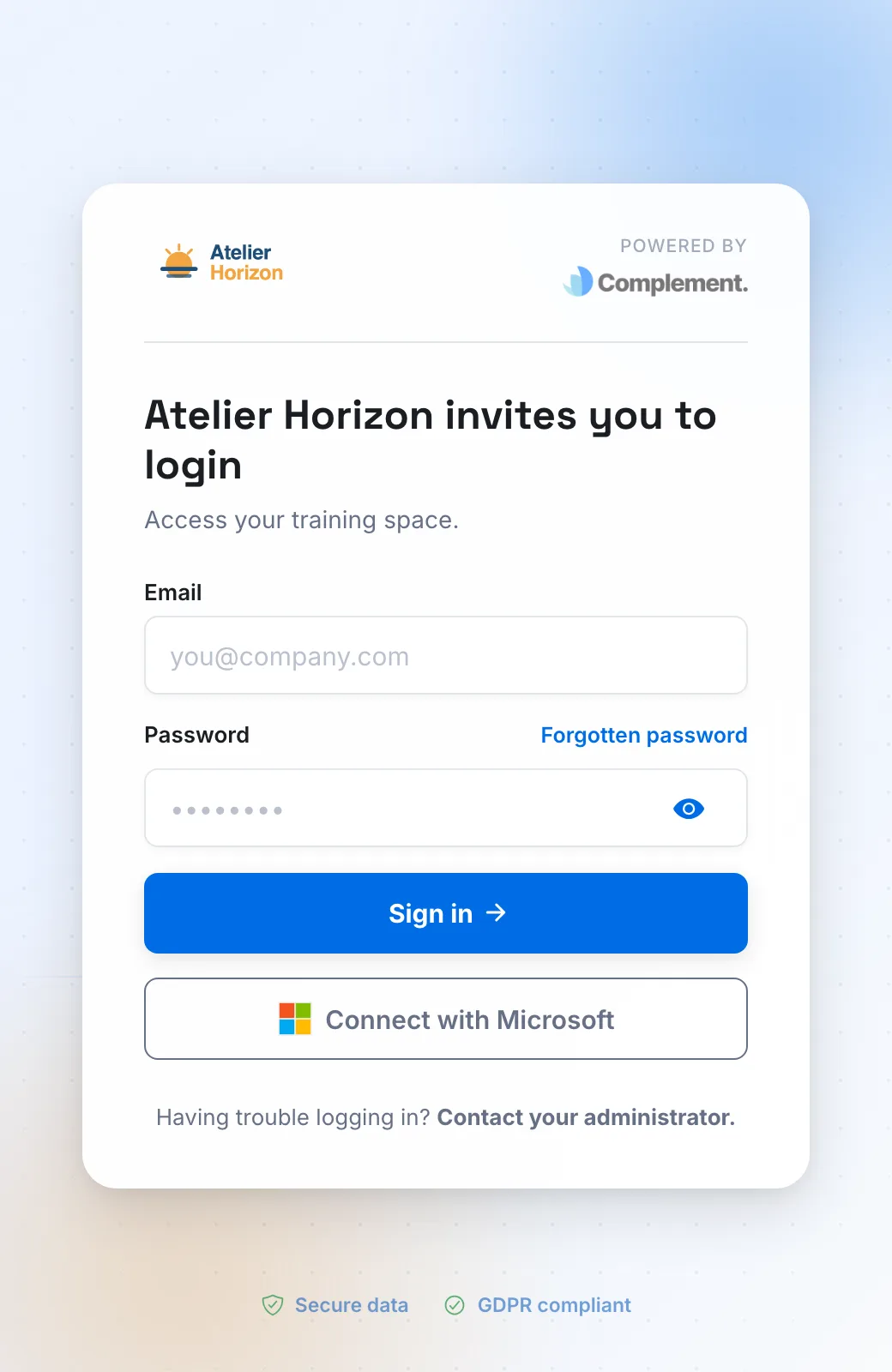
If your platform uses SSO, this page also shows your provider's button. See Enable SSO sign-in with Google or Microsoft.
In the app#
Once signed in at your address, your users see the brand's logos instead of Complement's in the app menus.
Emails#
The platform's emails are sent with the brand's sender name: account creation, forgotten password, announcement of a new course, reminders. Their links lead to your platform's address.
The sending address itself does not change: it is Complement's. Only the sender name is the brand's.
Was this article helpful?
Thank you for your feedback!
Thank you. Tell us what is missing through Help and support in the app, and we will complete the article.