

Data security and privacy
Hosting in Europe, what the teaching team sees, private camera, anonymisation and data deletion: the answers for your IT department.
In Administer your platform
- Customise your organisation
- Manage the teaching team
- Track usage
- Activate your platform
- Manage your subscription
- View your enterprise contract
- Why is your platform read-only?
- Understand your administrator alerts and emails
- Enable SSO sign-in with Google or Microsoft
- White-label your platform
- Which options should you ask your Complement account manager for?
- Connect your LMS with LTI 1.3
- LMS: add courses, manage groups and grades
- Data security and privacy
This article answers the questions of security officers and IT departments: where the data is hosted, what the teaching team sees and what happens to deleted data.
Hosting#
Complement is hosted in Europe, currently mainly in Sweden and Belgium. The sign-in page says so ("Hosted in Europe"), along with the words "Secure data" and "GDPR compliant".
For details of Complement's commitments, see the Security and compliance (in French) page.
What the teaching team sees#
Conversations with the avatar are anonymous#
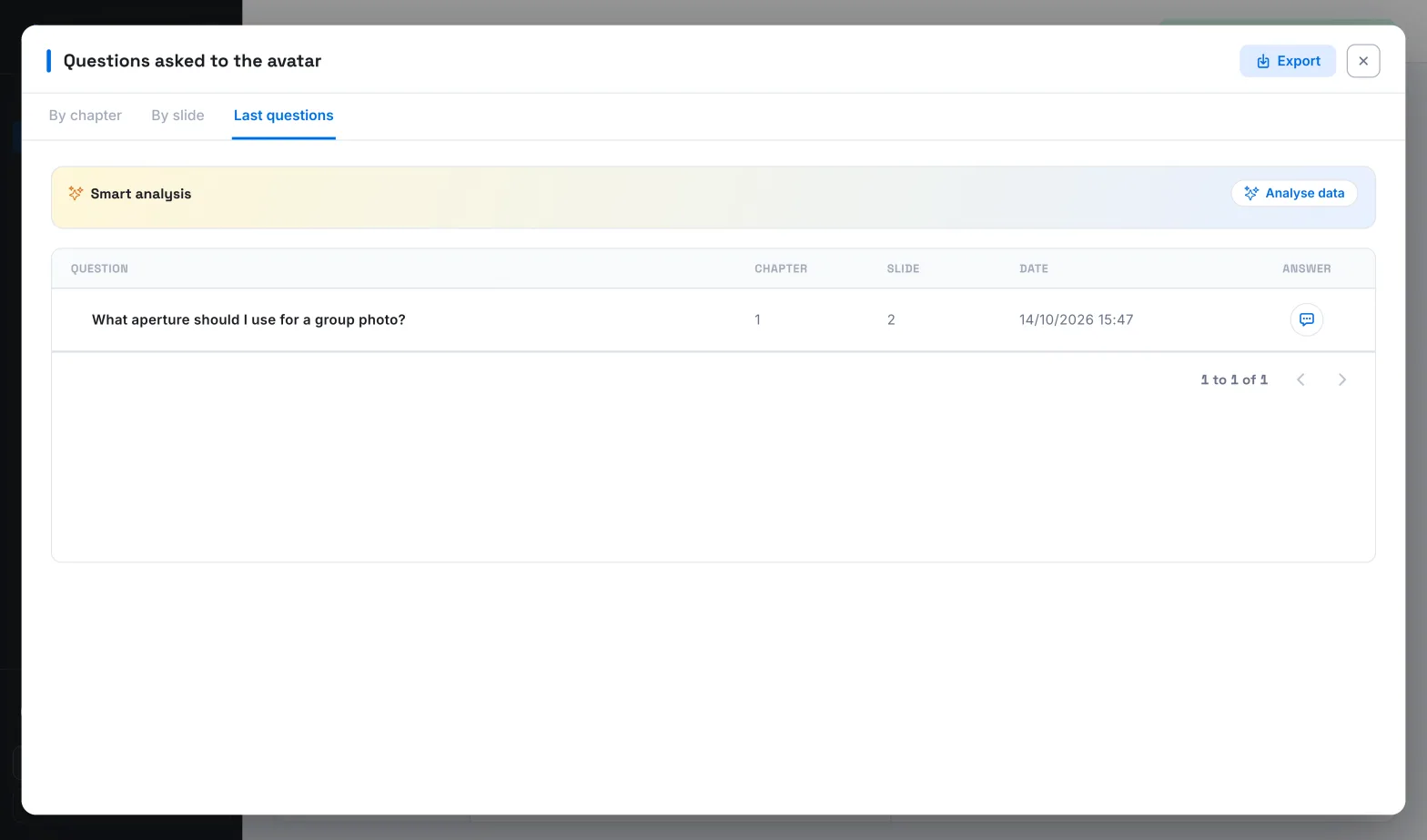
In a course's Dashboard, the Questions asked to the avatar are shown without the learner's name: you see the question, the chapter, the slide, the date and the avatar's answer. The Quiz results and the answers to interaction questions and surveys are also shown without names, as are their exports.
On a learner's tracking page, the teaching team only sees the number of questions they asked the avatar, not their content. The My AI avatar questions list is only visible to the learner themselves.
What remains visible for each learner#
A course's Progress tab and its export identify each learner by their name and email address. They show:
- their team;
- their progress;
- their score and the quizzes they have passed;
- their time spent;
- their status and their start and end dates.
A learner's tracking page also shows, course by course, their progress, their score, their time spent and their status.
The learner's camera#
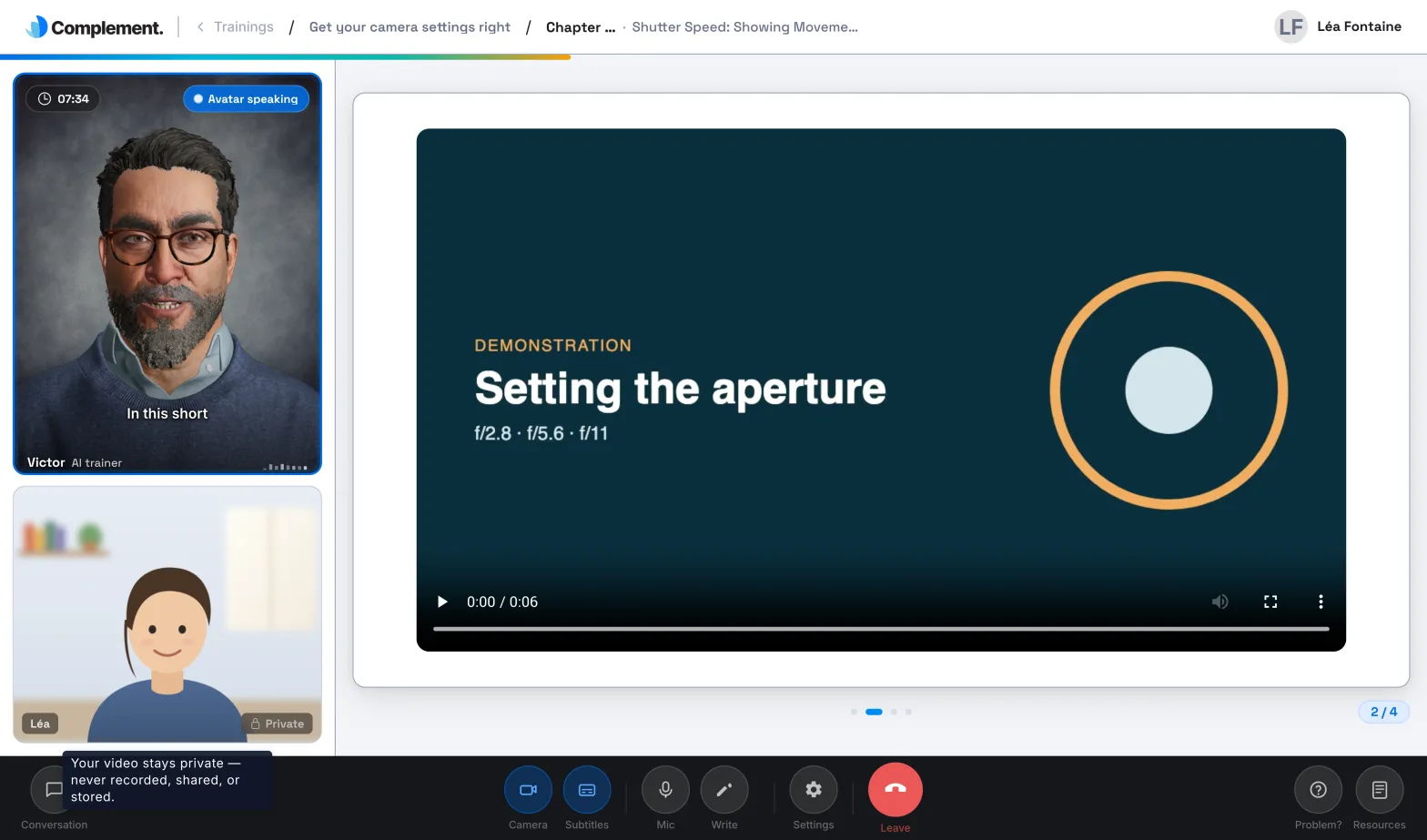
In the player, the camera stays off until the learner turns it on. Once on, it shows them their own image next to the avatar. This image stays in their browser: it is neither sent nor recorded. The player says so with the Private label and the tooltip "Your video stays private — never recorded, shared, or stored."
Delete data#
A learner#
Deleting a learner is permanent. Their account is anonymised: their name becomes "Deleted User", their email address is erased and they can no longer sign in. They disappear from your lists. In a course's progress export, their results remain, with no name or email address. See Delete learners.
A member of the teaching team#
Their account is deleted: they can no longer sign in, and their profile and preferences are erased. The app warns you: "This action is final and cannot be undone." See Manage the teaching team.
A course#
Deleting a course cannot be undone. It is removed from all teams. Its content, its files and its dashboard data are deleted: questions asked to the avatar, answers to quizzes, interaction questions and surveys.
Was this article helpful?
Thank you for your feedback!
Thank you. Tell us what is missing through Help and support in the app, and we will complete the article.